If you are a resident of Haryana, you may already be familiar with the Haryana Family ID, officially known as the Parivar Pehchan Patra (PPP). It is a unique family identification system introduced by the Haryana government to provide residents with easier access to government services and welfare schemes through a single digital family record.
In this comprehensive guide, you will learn everything you need to know about the Haryana Family ID Login process. We will explain how to register for a new PPP Family ID, log in to the official portal, update family information, check your application status, and download your Family ID online. You’ll also find useful tips for keeping your account secure and ensuring your personal information remains protected while using the portal.
The Haryana Family ID is associated with the Parivar Pehchan Patra (PPP) system. Government information describes the PPP as a digital record containing basic information about families in Haryana.
What makes this PPP ID especially useful is that it is not static. Once your family is registered, the ID automatically stays connected to important life events such as births, deaths, and marriages. This means your family records update themselves over time instead of requiring you to visit an office every time something changes.
The Haryana government created this system to reduce paperwork, cut down on duplicate applications, and make sure that welfare benefits reach the right people without unnecessary delays.
Haryana Family ID Services
Different Family ID tasks have different requirements. Instead of putting every procedure on this page, we have separate guides for the most common tasks.
- Existing users may need to access the relevant official PPP service to view or manage family information.
- Before entering your Aadhaar number, Family ID or OTP, make sure you are using an official Haryana government website.
Official PPP information:
https://meraparivar.haryana.gov.in/
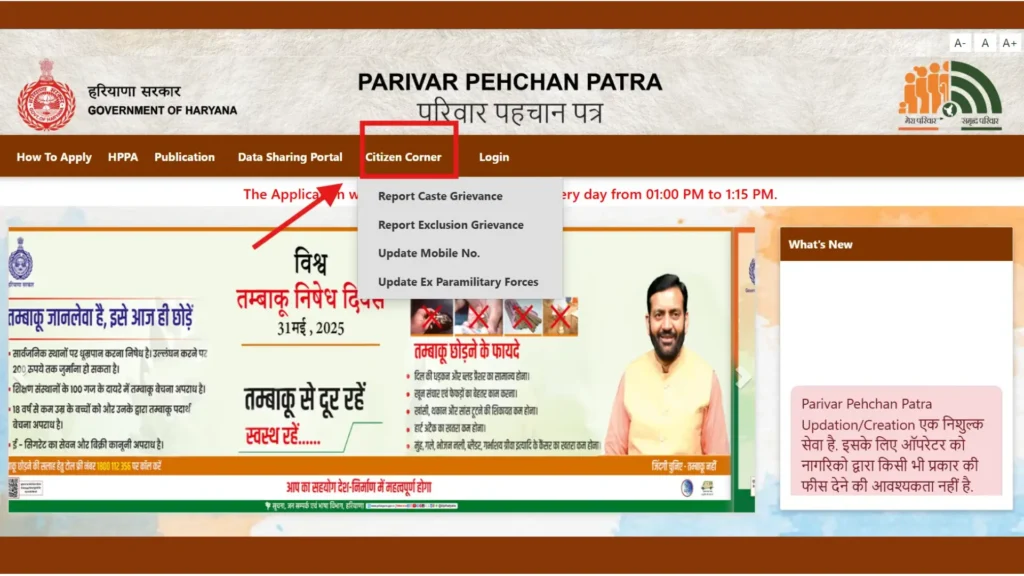
Since your Family ID holds sensitive personal and financial information, keeping your login secure matters a lot. Keep these points in mind:
- Only use the official PPP Haryana website never a third-party or unverified link.
- Avoid logging in from public or shared computers, and stay away from unsecured public Wi-Fi.
- Always log out properly once your work on the portal is done.
- Never share your password or OTP with anyone, even if they claim to be from a government office.
If your family does not already have a PPP record, start with our detailed registration guide.
Read: Haryana Family ID Registration
The guide explains the registration process, information that may be required and important points to check before submitting an application.
- Aadhaar cards of family members
- Mobile number of the family head
- Address proof (such as an electricity bill)
- Age proof (birth certificate or matriculation certificate)
- Voter ID for adult members, if available
- Bank account details for benefit transfers
- Income or caste proof, where relevant
Registration for the Haryana Family ID Login is completely free, and the verification process usually takes between 10 to 30 days.
Family information can change over time. Depending on the type of change and the service available to you, you may need to update information in your PPP record.
Examples can include changes involving:
- Family members
- Personal information
- Address
- Mobile number
- Other family-related details
Do not upload documents or personal information to an unofficial website.
Read: How to Update Haryana Family ID
- If you have submitted a request and want to know what happened to it, use the appropriate official portal or service.
- Our separate guide explains the status-check process and common problems users may encounter.
Read: How to Check Haryana Family ID Status
If your status shows “Approved,” you can move forward to download your Family ID. If it shows “Rejected,” review the reason, correct the errors, and resubmit your application.
If you need a copy or printout of your Family ID information, use the official service available through the Haryana PPP system.
The exact options shown to a user may depend on the current portal and account status.
Read: How to Download Haryana Family ID
Why Is Keeping Family Information Accurate Important?
Accurate family information can help avoid problems when your details are used for government services.
For example, an incorrect name, date of birth, relationship, address or other family information may create a mismatch when a department checks your record.
Before submitting an update:
- Check the information carefully.
- Compare important details with your supporting documents.
- Make sure the mobile number you use is accessible.
- Review the request before submitting it.
- Save any acknowledgement or reference number provided by the official system.
What If the PPP Haryana Portal Is Not Working?
Sometimes users may experience problems while trying to access a government website. The problem may be temporary, or it may be related to a browser, network, OTP, or account issue.
Before assuming that your Family ID is incorrect, try:
- Refreshing the page.
- Checking your internet connection.
- Using an updated browser.
- Clearing the browser cache if the website is behaving unexpectedly.
- Trying again later if the official portal is temporarily unavailable.
- Checking whether the problem is related to OTP delivery.
- Using official support channels if the issue continues.
For a more detailed troubleshooting guide:
Read: PPP Haryana Portal Not Working: Common Problems and Solutions
How to Protect Your Family ID Information
Your Family ID-related information may contain personal details about your household. Treat it carefully.
Never Share Your OTP
- An OTP should only be entered on the legitimate government website or application where you initiated the verification process.
- Do not give an OTP to someone who contacts you by phone, WhatsApp or social media and claims to be helping with your Family ID.
Check the Website Address
- Before entering personal information, check that you are on the correct official Haryana government domain.
- Do not rely only on the appearance of a website because unofficial sites can use similar names or designs.
Avoid Unofficial Agents
- Be cautious if someone promises faster approval, guaranteed correction or special access in exchange for money or personal information.
- Use the official process whenever possible.
Sources and Verification
The information on this page is intended for general guidance. Government portals and service procedures can change, so users should verify current requirements before submitting an application.
Primary sources used for general PPP information include:
- Government of Haryana resources
- Haryana government citizen-service portals
- Mera Parivar Haryana / PPP portal
For example, an official Haryana government FAQ describes the PPP as a digital family record and directs users to the Mera Parivar portal for more information.
About This Website
- pppharyanafamilyid.com provides independent informational guides about Haryana Family ID, PPP-related services and other citizen-service topics.
- We aim to explain government processes in simple language and help readers understand where to find the relevant official service.
- We do not collect applications, issue Family IDs, approve requests or represent the Government of Haryana.
Author
Rehmat Khan— Content Writer
Rehmat Khan writes informational guides covering Haryana government services, digital citizen services, and online application processes. His work focuses on explaining complicated procedures in simple language while directing readers to official sources for verification.
Editorial note: Government procedures, portal interfaces and document requirements can change. Information should be checked against the relevant official source before taking action.
The Family ID Haryana system brings several real advantages to residents:
- Centralized Data: All family information is stored in a single, organized record.
- Easy Access to Schemes: You can apply for various government benefits without repeatedly submitting the same paperwork.
- Faster Benefits: Pensions, rations, and scholarships become easier and quicker to access.
- Clear Tracking: You can see exactly which benefits your family is receiving.
- Convenient Online Management: Updates and status checks can be done anytime from home.
- Fraud Prevention: Verified data helps reduce duplicate or fraudulent claims.
- Connected Services: The ID links smoothly with services like the PPP Haryana ration card and other certificates.
| Purpose | Link |
| Official Website | https://meraparivar.haryana.gov.in/ |
| Citizen Corner | https://ppp-office.haryana.gov.in/ |
| Saral Portal | https://saralharyana.gov.in/ |
| For Help | Visit your nearest Saral Kendra or contact support via the portal (toll-free number available through district offices) |
Any resident of Haryana can apply for a Family ID. Generally, the head of the family submits the application on behalf of all household members.
It usually takes 10 to 30 days after your documents and personal details have been successfully verified.
Yes. You can update your Family ID by adding or removing family members and editing most personal information through the online portal.
You can recover your account using your registered mobile number. An OTP will be sent for verification. If required, you can also contact the official support team.
Yes. You can update your mobile number through the Citizen Corner section after completing OTP verification.
The Family ID is used for several government welfare schemes, including ration cards, pensions, scholarships, housing benefits, and Ayushman Bharat health coverage.
You can apply online by completing the registration process, starting with Aadhaar verification and submitting the required family details.
You can search for your Family ID by logging into the official portal using your Family ID, Aadhaar number, or registered mobile number.
The Haryana Family ID has genuinely simplified how residents interact with government services. Whether you are registering for the first time, updating your family details, checking your application status, or downloading your final ID, the entire process can be completed online without unnecessary paperwork or repeated office visits. Keeping your Family ID Haryana details accurate and up to date ensures that you and your family never miss out on the benefits you are entitled to. Just remember to always use the official PPP Haryana portals and protect your personal information at every step.